Securing the email surface is one of the top areas for security leaders to prioritize. Email is a prime target for cyber threat actors, who exploit the email channel for sophisticated phishing and social engineering attacks.
AI is accelerating email risk. Attackers are now using AI to accelerate phishing and social engineering campaigns. This makes spotting harmful email even more difficult, as there are no easy tells when an email is malicious.
In fact, a recent nation-state-backed campaign which exploited an email vulnerability meant you only had to open an email to run the risk of having passwords and 2FA codes compromised.
The answer is a strong email security solution. CISO Voice have reviewed the best email security solutions for CISOs to narrow down the top 5. We looked at filtering capabilities, the user interface, reporting, additional admin features, support, end-user experience and more, to help you choose the best solution.
In this guide we’ll take you through our findings. This list is based on our opinion of the products reviewed. We’ve conducted real hands-on tests of the solutions, and we’re completely unbiased and rigorous in our methodology.
The best email security solutions at a glance
| Ranking | Vendor | Deployment | Platform | Best For |
| 1 | Proofpoint | SaaS, API-based, traditional gateway | M365, Google Workspace, Exchange | Broadest feature set and capabilities |
| 2 | Check Point Harmony Email & Collaboration | SaaS (API-based, optional inline) | M365, Google Workspace | Detection depth and remediation |
| 3 | IRONSCALES | SaaS (API-based) | M365, Google Workspace | Protection against targeted phishing and BEC |
| 4 | Abnormal AI | SaaS (API-based) | M365, Google Workspace | Behavioral detection of email threats |
| 5 | Microsoft Defender for Office 365 | Native to M365 | M365 | Native M365 protection, especially with E5 |
What you need to know about email security solutions
What is the best email security solution?
In our testing, we found the best email security solution to be Proofpoint. It has the broadest range of features for enterprise organizations. It supports a deep set of features and has advanced detection capabilities that suit large enterprise environments. Proofpoint recently simplified its pricing structure and has recently added a new API offering to replace its traditional SEG deployment process.
What are email security solutions?
Email security solutions are cybersecurity products that protect your email infrastructure. They continuously scan your email network for unwanted or malicious email content and automatically remove it from your users’ inboxes.
In the past, email security would be delivered via a ‘Secure Email Gateway’ or SEG. The SEG would sit as a barrier, intercepting inbound and outbound email content to prevent malicious emails being delivered, or sent in the event of a mailbox compromise.
Modern email security systems take this a step further. They now deploy directly into cloud email infrastructure like Microsoft 365 or Google Workspace, and scan internal email content in real-time. This means that malicious emails can be removed from all users at once, users can report malicious email messages, and admins can easily track and remediate risk from a single admin console.
This is important as the pace of email risk continues to escalate. Generative AI has seen an explosion of phishing content that looks highly realistic to most email users. Spear-phishing and business email compromise also continue to escalate.
What features do email security solutions cover?
Email security solutions often offer a broad set of capabilities. They protect against phishing, social engineering, malware and spam by analyzing the content of email messages and senders and deciding whether an email message is safe enough to be delivered, or if it should be blocked, quarantined or put in a junk folder.
Email security solutions also include a dedicated admin console where you can investigate incidents, configure policies, and manage email content. For example, many companies will block specific malicious domains or locations and set policies around graymail and marketing lists.
Many solutions also provide additional features like email encryption, DMARC, email archiving, security awareness training and more. Enterprise solutions will integrate with endpoint, identity and other security services. Most modern solutions will extend these capabilities to other messaging platforms outside of email, like Microsoft Teams and Slack.
Our methodology
We have tested every solution on this list in our own email environment, and where possible we have spoken to partners and customers who use these solutions full time.
We specifically looked at the following areas:
- Spam filtering and malicious email inspection
- URL and attachment analysis and protection
- Phishing and social engineering protection
- The deployment process
- Account takeover prevention
- Security awareness training and phishing simulation
- DMARC support
- Email archiving and encryption
- Outbound email security
- Integrations with other security controls
- Admin controls and dashboards
- Reporting and auditing
- End user quarantine access
- User experience
This won’t cover all use cases and businesses, and we know all requirements will be different. This list is primarily designed to help CISOs working for mid-market and large enterprises.
Our experience with email security solutions
Why trust us? This article has been technically reviewed by Craig MacAlpine. In 2003, Craig launched EPA Cloud, a leading email security service provider based in the UK. He ran this business for over ten years, supporting a range of businesses including many of the UK’s leading universities, and partnering with multiple email security providers.
Craig sold EPA Cloud in 2013 to J2 Global, now part of the Ziff Davis network. His business is now part of the VIPRE Email Security suite. After selling his business, Craig went on to found Expert Insights, a cybersecurity product review and analysis website.
Expert Insights has reviewed dozens of the best email security solutions on the market and produced several independent reviews and deep dives used by thousands of businesses globally to evaluate email security software. This article has been written by Joel Witts, Expert Insights’ cofounder and Content Director, who is also the founding editor of CISO Voice.
Joel has interviewed experts from across the email security space, including the CEOs, CISOs or technical leads at all of the email security solutions referenced on this list. We’ve put this list together with no commercial incentives and it’s entirely based on our own opinions of the products listed.
Best email security solutions, ranked and reviewed

1. Proofpoint Prime Threat Protection
Best for: Broadest feature set and capabilities
Proofpoint is a market leader in the email security space. Its enterprise email security product is called Proofpoint Prime Threat Protection. This provides highly advanced email filtering, granular admin controls, and social engineering protection capabilities.
Proofpoint has expanded to cover much more than just the email market in recent years and describes itself as tackling the complete set of security requirements for addressing human and AI agent security. This means email, but also collaboration security, data security and governance, and AI controls.
In practice, Proofpoint provides multi-layered protection with AI and machine learning models built to quickly surface and protect against potential threats, whether from external actors or insiders.
Proofpoint also offers an SMB-focused solution, named Proofpoint Essentials, which we have also reviewed. Proofpoint Essentials bundles email security, archiving and encryption into one platform, which is now also available via API deployment. In 2025, Proofpoint acquired German email security provider Hornetsecurity, which is now being used as the foundation of the Proofpoint Essentials detection engine.
As part of its email security platform, Proofpoint offers email protection, account takeover protection, email isolation, browser isolation, security awareness training, internal mailbox scanning, email encryption, DMARC and DLP.
Our Proofpoint Prime Threat Protection review
We highly rated Proofpoint and would recommend it as the best all-in-one email security solution for most enterprises, especially large enterprises.
In our testing we found Proofpoint to be very effective at blocking advanced email threats. It offers a very broad set of capabilities and features for protecting email, but also extends this to other areas of enterprise security like insider threat detection.
Proofpoint automatically blocks threats that contain malicious attachments or ransomware. Users can report messages as malicious, and admins can get full visibility into email risk via the admin console. You can also deploy security awareness training, which is well designed and easy to manage.
Proofpoint has a very strong advantage when it comes to threat remediation due to its market-leading threat protection engine built on data from over 80 of the Fortune 100 and over 10,000 large enterprises, which gives it huge visibility into email risks.
The admin console is clear and well designed. There are a couple of deployment options, including traditional SEG deployment via redirecting MX-records, and fully native API-deployment into M365 and Google Workspace environments. We also like that end users can visit their own email quarantine.
With that said, Proofpoint is an enterprise offering. While pricing is not public, the service is expensive, and Gartner reports pricing has increased significantly in recent years.
Proofpoint does offer a lower-cost solution, Proofpoint Essentials, which we also do highly rate. However, there is currently some uncertainty with the platform due to Proofpoint’s acquisition of Hornetsecurity, which is being rolled out as a replacement for the current Essentials email filtering engine. This is likely to lead to some pricing changes, particularly for MSPs and resellers.
Proofpoint Prime Threat Protection key features
- Sandboxing pre-delivery and at click time, with URL rewriting to catch post-delivery weaponization and evasion tricks like CAPTCHAs and password-protected files.
- Nexus Threat Graph applies AI models to detect BEC and other payloadless attacks.
- Email and Browser Isolation contain risky links and webmail.
- Email Fraud Defense enforces DMARC and blocks spoofed mail.
- Internal Mail Defense pulls malicious internal messages, including forwarded copies.
- VAP and Top Clickers reports show who is targeted and who clicks, with adaptive controls for those users.
- Forensics show attack origin and objective, and correlate email attacks with suspicious logins.
- Phishing simulations and Email Warning Tags with one-click reporting.
- Email DLP with prebuilt PCI DSS, SOX, HIPAA, and GDPR policies.
Proofpoint info
- Founded: 2002
- HQ: Sunnyvale, California
- Ownership: Private (Owned by Thoma Bravo)
- Deployment: Supports inline (gateway) and via API.
- Platforms supported: M365, Exchange, GWS
- Support hours: 24/7/365
Proofpoint Pricing
Proofpoint doesn’t publish pricing, and enterprise plans are quote-based. Gartner reports that Proofpoint’s prices have increased significantly in recent years. Proofpoint Essentials is the lower-cost option for smaller organizations.
Pros and cons
Pros
- Highly regarded, advanced email security product with strong feature-set and broad capabilities.
- Supports organizations of all sizes and industries.
- Clear vision extending beyond email to address insider threats and AI risks.
- Clear and well-designed user interface.
- Highly accurate detection capabilities.
- Trusted history as an email security market leader.
Cons
- Pricing has increased over recent years.
2. Check Point Harmony Email & Collaboration
Best for: Detection depth and remediation
Check Point is one of the world’s largest cybersecurity solutions providers, offering a vast range of solutions and services for companies of all sizes. Its email security service, Harmony Email & Collaboration, is built around its acquisition of Avanan in 2021. Check Point Harmony Email is built specifically for cloud email environments and SaaS and provides a unified solution that protects against malicious files, URLs, and phishing attacks.
Check Point Harmony Email also integrates directly with Check Point’s Horizon XDR/XPR. This makes it the only current email security solution that extends protection against malicious files, URLs and phishing across email, SaaS apps like Teams, the web, network and endpoint devices.
Check Point’s email security solution connects to M365 and Google Workspace by API, as well as to collaboration and file sharing apps like Slack, Teams, Dropbox, Box and ShareFile. It scans inbound, outbound, and internal email, and admins can add inline protection for outbound and internal mail through an SPF record.
It uses AI engines to monitor and detect suspicious email content, looking at behavioral signals and indicators to detect and remediate potential threats like sophisticated phishing and account compromise attempts. Check Point’s ThreatCloud analysis engine uses over 50 different AI engines to scan email activity. Check Point also offers a security awareness training module.
Harmony Email & Collaboration is managed through Check Point’s Infinity Portal. Organizations that already use Check Point for network, endpoint, or cloud security can run all of these products through one admin dashboard.
Check Point protects over 100,000 organizations of all sizes. Its enterprise products include CloudGuard and Quantum, which secure clouds, network perimeters and data centers.
Our Check Point Harmony Email review
We recommend Check Point for teams of at least 150 looking for a fully featured email security solution with excellent remediation capabilities. It offers enterprise-level integrations with the wider Check Point stack but is still a very strong solution for smaller teams as well.
We liked how much detail you can drill into when analyzing email content. The admin console shows all of the layers of scanning an email message went through before being delivered to a user (for example Microsoft Defender, plus Check Point’s engines). You can also see live inspection logs and view a breakdown of the AI models used to inspect email content. A confidence score is provided for phishing, semantic phishing and spam, so you can see exactly why a verdict was reached.
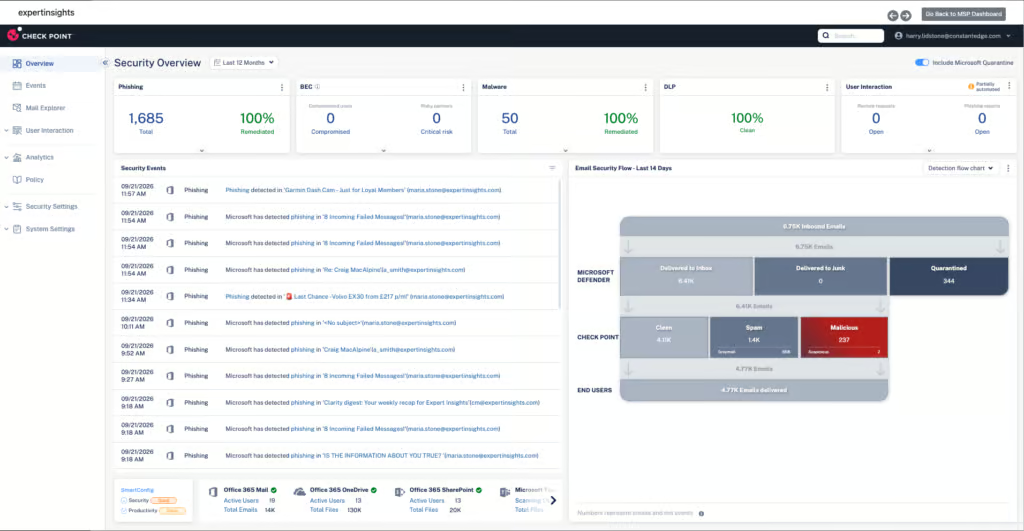
In our environment we found it very effective at blocking threats. It goes beyond just scanning email content and analyzes the relationship between contacts to flag anomalies. It’s straightforward to apply email policies to different groups, including DLP policies for different teams.
Deployment is extremely quick. We were up and running in about two minutes, though it does take longer to set up and configure the different security engines. You don’t need to configure MX-records, but if you want to roll out inline protection for outbound and internal email you will need to add a record to SPF. The admin console is clear but will take some time to learn. Some settings do need to be fine-tuned as part of the initial onboarding, and we found some controls are buried in settings menus.
If an email is reported, you can quickly confirm it as genuine phishing and pull it across the organization (or tenant if you are an MSP). Users can report email via the Microsoft built-in ‘Report Phishing’ button or Check Point’s own Outlook Add-in. The AI evaluates emails automatically and recommends an action for admins to take. Reporting is well developed. You can easily schedule a branded report weekly, monthly or quarterly, which gets emailed to anyone who needs it.
Check Point Harmony Email key features
- AI engines analyze metadata, links, attachments, language, and past communication between sender and recipient to catch impersonation and BEC.
- Harmony Email & Collaboration scans inbound, outbound, and internal email, including QR codes.
- Threat Emulation sandboxes attachments to catch malware seen for the first time, while Threat Extraction delivers a cleaned copy of the file in the meantime.
- DLP policies with hundreds of predefined data types block or unshare sensitive data in email and collaboration apps.
- Account takeover protection feeds login signals to your identity provider so it denies suspicious sign-ins.
- Protection extends to Teams, Slack, SharePoint, OneDrive, Google Drive, Box, Dropbox, and ShareFile.
- The email detail view shows every security layer a message passed through, live inspection logs, and a confidence score from each AI model.
- Admins can pull a reported email from every mailbox in the tenant in one action.
- Report Scheduler emails branded executive reports weekly, monthly, or quarterly.
- A retroactive scan at deployment finds threats already sitting in mailboxes.
Check Point info
- Founded: 1993
- HQ: Tel Aviv, Israel (US headquarters: San Carlos, California)
- Ownership: Public (NASDAQ: CHKP)
- Deployment: API, with optional inline protection for outbound and internal email
- Platforms supported: M365, Google Workspace
- Support hours: Business hours on the Standard plan, 24/7 on Premium and above
Check Point Harmony Email pricing
Check Point doesn’t publish pricing, and plans are quote-based. It sells two tiers, for email only or for email and collaboration apps: Advanced Protect covers phishing, account takeover, URL emulation, sandboxing, and file sanitization, and Complete Protect adds DLP. Archiving, DMARC management, and AI phishing training are sold as add-ons.
Pros and cons
Pros
- API deployment in minutes, with no MX change
- Strong detection in our testing, including relationship analysis and QR code scanning
- Email detail view shows every scanning layer and each AI model’s confidence score
- Pulls a reported email from every mailbox in one action
- Flexible policy scoping, including DLP policies for individual teams
- Scheduled, branded reports for executives
- Managed from the same console as the rest of the Check Point stack
Cons
- More setup than most API-based tools, with a separate policy to tune for each security engine
- Some settings are buried in menus
- 24/7 support only on Premium plans and above
3. IRONSCALES
Best for: Protection against targeted phishing and BEC
IRONSCALES is an AI email security platform for Microsoft 365 and Google Workspace. It continuously scans your email environment to identify sophisticated email threats, like phishing and business email compromise, QR code attacks and spam.
It uses a combination of agentic AI, machine learning and human community-led reports to catch and remediate email threats. IRONSCALES also offers a fully featured awareness training platform, and extends protection to Microsoft Teams with full deepfake protection.
IRONSCALES connects to your mailboxes by API, with no change to your MX records. It also integrates with wider security tools, including SIEM, SOAR, XDR and EDR.
IRONSCALES uses multiple AI engines, including natural language processing and natural language understanding, to build a behavioral baseline of normal email content, so it can understand when risky content is delivered. For example, it will alert you if someone you normally communicate with suddenly starts using a new email address, which could be an indicator of a phishing attack.
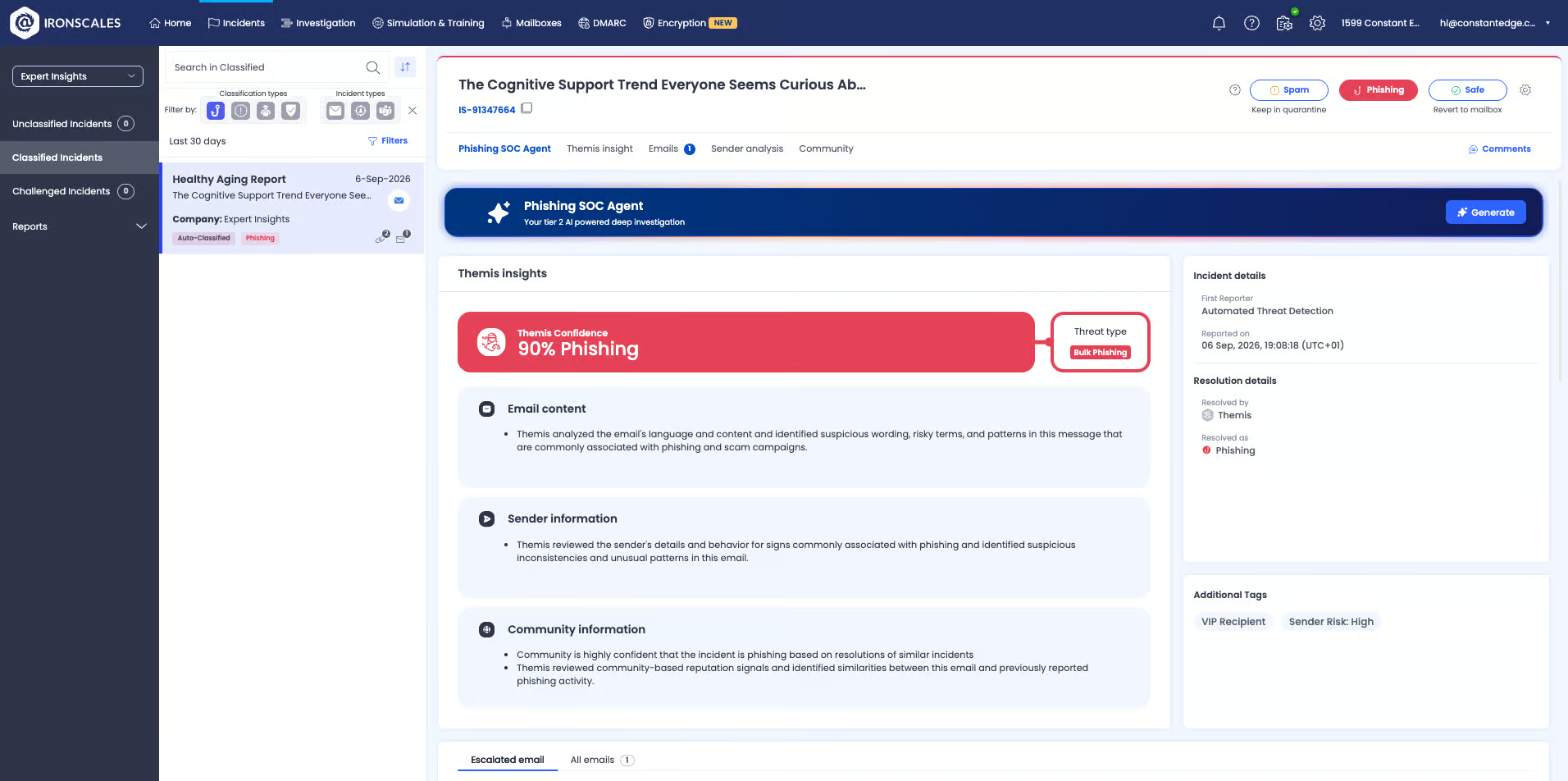
End users can also report suspicious email content directly. These reports feed into community intelligence shared across IRONSCALES’ 18,000+ customer organizations, so an attack reported at one organization is blocked at the others. IRONSCALES’ Themis AI agent can automate remediation for emails. It automatically classifies threats, either detected by IRONSCALES or reported by users, and handles them automatically.
Beyond just inbox protection, IRONSCALES covers account takeover, graymail, hosted DMARC, and context-based outbound encryption. Deepfake protection for Microsoft Teams meetings checks participants’ identity using visual and voice analysis. IRONSCALES also includes phishing simulation and security awareness training.
IRONSCALES describes itself as fully AI native and offers a few agents designed to improve security outcomes. The Red Teaming Agent researches your organization the way an attacker would and trains detection on the attacks it builds. The Phishing SOC Agent investigates suspicious emails. The Phishing Simulation Agent builds simulations tailored to each employee.
IRONSCALES says it protects more than 18,000 organizations, and more than 3,000 MSPs.
Our IRONSCALES review
We’ve used IRONSCALES internally for several years. We rate the platform and we’d strongly recommend it for SMBs, especially those who have been hit by spear phishing attempts in the past. It’s very good at blocking sophisticated, targeted email attacks and account takeover attempts.
The platform is very easy to use from an admin perspective. Deployment takes just a few minutes. You simply sync mailboxes, choose which users to protect, and the platform is deployed. It’s fully API-based, with no MX-record changes. Because of this you don’t have to roll IRONSCALES out to the whole organization, you can just protect your higher-risk users.
The security awareness training module is particularly easy to manage and deploy compared to other comparable phishing simulation solutions we’ve tested. You simply pick how frequently you want to test users and the campaigns run fully automatically.
In our experience, IRONSCALES performs exceptionally well against targeted threats like social engineering and account compromise, due to its combination of AI engines and crowdsourced email reporting. It’s a little weaker on general spam filtering. A few DocuSign-style lures got through during our evaluation of the platform. These are hard for any email tool to catch, because the malicious content sits several layers deep behind the link.
IRONSCALES has one of the best workflows we’ve tested for remediating malicious emails. If an end user reports an email as phishing, IRONSCALES pulls every copy from every mailbox in the tenant.
Users can report emails through IRONSCALES’ Outlook add-in. Admins then receive an email with one-click actions, the sender details, the AI’s confidence score, and community intelligence. Marking an email safe returns it to the mailbox. Every report also helps to train the AI models.
The admin console is usable, but finding specific incidents can be tricky. Only emails flagged by a policy or warning appear in the portal, so you don’t see all mail flow. For board reporting, the summary report covers emails inspected, incidents and how each was resolved, the split between automatic and analyst resolution, analyst hours saved, and your most-targeted users.
Support is by email and responds quickly across time zones. First-line support has been solid, and harder issues go to IRONSCALES’ R&D team, from whom we’ve had strong, detailed answers.
One final point is that we really rate how innovative the IRONSCALES platform is. They often release new AI agents and capabilities to uplift the value of the platform. One recent addition has been deepfake protection for Microsoft Teams. This extends IRONSCALES’ phishing detection capabilities into the new attack surface of AI deepfakes.
IRONSCALES key features
- Themis, IRONSCALES’ Adaptive AI, builds a behavioral baseline for every mailbox and gives each verdict a confidence score.
- Community intelligence pools phishing verdicts from 36,000+ security professionals across 18,000+ organizations.
- IRONSCALES blocks phishing, BEC, malware, QR code lures, spam, and graymail.
- Reporting an email as phishing pulls every copy from the tenant, with similar emails grouped into a single incident.
- The Report Phishing Outlook add-in confirms each report to the user and sends admins one-click actions.
- Admins can protect every mailbox or only selected high-risk users.
- The Phishing SOC Agent investigates suspicious emails, checking the sender, links, attachments, and relay path.
- The Red Teaming Agent researches your organization the way attackers do and trains detection on the attacks it builds.
- Phishing simulation and awareness training run as autonomous campaigns that recur each year.
- Deepfake protection for Teams meetings uses visual and voice analysis.
- Account takeover detection, context-based outbound encryption, and hosted DMARC.
IRONSCALES info
- Founded: 2014
- HQ: Atlanta, Georgia
- Ownership: Private (venture-backed. PSG led a $64m Series C in December 2021, with K1 participating)
- Deployment: API only.
- Platforms supported: M365, Google Workspace
- Support hours: 24/7
IRONSCALES pricing
IRONSCALES doesn’t publish prices, and plans are quote-based, with monthly or annual billing. It sells three business plans (Email Essentials, Email Protect, and Email Protect 360) and separate plans for MSPs. Gartner rates IRONSCALES’ pricing as competitive and transparent.
Pros and cons
Pros
- Strong at catching targeted phishing and BEC
- Innovative platform that also covers AI deepfake detection within Teams
- API deployment in minutes, with no MX change
- One click pulls a reported email from every mailbox
- Protect the whole organization or only high-risk users
- One of the easiest awareness training modules we’ve used
- Responsive support, with escalation to the R&D team
- Summary report includes board-ready ROI metrics
Cons
- Weaker on general spam filtering
- Only emails flagged by a policy show in the portal, so there’s no view of all mail flow
- Finding incidents and reversing false positives can be fiddly
- No block list in the portal

4. Abnormal AI
Best for: Behavioral detection of email threats
Abnormal is an AI-native email security solution, popular with enterprises and supporting 25% of the Fortune 500. It’s a leader in the new generation of email security solutions built specifically for cloud-based email platforms. Its differentiator is that it uses behavioral data science to power machine learning algorithms that detect and block advanced email attacks.
These systems were designed to catch email threats that legacy email security gateways miss, like advanced phishing, social engineering and account compromise attempts. Because Abnormal maps what ‘normal’ user behavior looks like, it can catch threats inside your email network, rather than just catching attacks as they enter your environment.
Abnormal looks at 50,000 to 80,000 signals for every email, using AI and natural language processing to detect subtle indicators of harmful email content, like phishing or impersonation. They have also extended this threat detection to other corporate messaging apps, including Microsoft Teams, Slack and Zoom.
Abnormal’s platform covers inbound email security, account takeover protection, email productivity, phishing simulation and awareness training, email data loss prevention, and accidental email sending. The platform also extends beyond just email, with identity threat protection, insider threat detection, and AI governance.
Identity threat protection and insider threat detection are both based on Abnormal’s behavioral AI detection system to monitor and catch malicious activity, integrating with third party identity providers. The AI governance product maps out all AI tools, agents, and chats using identity and browser signals to map risks and enforce policies.
Our Abnormal AI review
We recommend Abnormal as a strong platform for enterprises looking specifically to tackle advanced email threats like account takeover and sophisticated phishing. It’s a strong choice for teams who want to layer email security on top of the built-in enterprise email security features offered by Microsoft 365 or Google Workspace.
Abnormal is very easy to deploy. It’s fully API-based and can be rolled out in less than five minutes. This architecture means it can see all internal-to-internal mail and build accurate behavioral data on how email is being used in your business. From there, it can detect and block suspicious email activity automatically. This protection can also be extended to Slack, Teams and Zoom, which is where a lot of internal conversations take place (at least for our team!).
The admin console is clear and easy-to-use, especially for an enterprise solution. We found the detection rates to be strong. We also like the end-user transparency. For example, the AI Security Mailbox feature, which uses AI to triage and remediate phishing emails reported by users. It then provides a generated, context-specific explanation of the potential risks, like whether the domain has DMARC enabled. Users can even reply to the email to ask for more information.
We also highly rate Abnormal’s account compromise detection engine, which is effective at spotting an email account that has been hacked. Abnormal has expanded these capabilities beyond just email accounts to also cover HR, CRM and ERP accounts.
In our conversations with Abnormal’s team we’ve found them to be very focused on their core email roadmap, though they have recently expanded the platform with security awareness training and phishing simulation, and AI governance solutions that leverage Abnormal’s behavioral detection engines.
Abnormal have a strong profile in financial services, healthcare, manufacturing, retail, technology and the public sector. Pricing is competitive, with Abnormal prioritizing strong customer relationships as it challenges the established giants in the email security market. With that said, Abnormal is more heavily focused on North America and Europe than on APAC and the Middle East.
We think Abnormal AI is well worth considering if you’re running M365 or Google Workspace and want to deploy a stronger level of protection for advanced phishing and business email compromise.
Abnormal Key features
- Attune, Abnormal’s behavioral AI model, learns how each employee and vendor normally communicates and flags messages that break the pattern.
- Inbound Email Security blocks BEC, vendor fraud, and phishing, including text-only emails with no links or attachments.
- Account Takeover Protection spots compromised accounts and can end sessions, block access, and force a password reset.
- Vendor data pooled across Abnormal’s customers flags compromised suppliers.
- AI Security Mailbox triages user reports, removes threats, and explains the verdict to each reporter.
- AI Phishing Coach builds training from attacks each user actually received.
- Messaging Security covers Slack, Teams, and Zoom.
- Email DLP Rules and Misdirected Email cover outbound mail, and Email Productivity filters graymail.
- Control Center runs custom rules, or AI models trained on sample emails, and tests them on past mail first.
- Every verdict shows which signals fired and why.
Abnormal AI info
- Founded: 2018
- HQ: San Francisco, California
- Ownership: Private (venture-backed; Greylock, Insight, Menlo Ventures, CrowdStrike, Wellington. $5.07bn valuation at Series D, August 2024)
- Deployment: API only. No inline gateway option.
- Platforms supported: M365, Google Workspace
- Support hours: Not published.
Abnormal AI Pricing
Abnormal doesn’t publish pricing, and plans are quote-based. In our experience, pricing is competitive for an enterprise platform.
Pros and cons
Pros
- API deployment in under five minutes, with no MX change
- Sees internal-to-internal mail and flags account takeover
- Behavioral detection catches text-only BEC and phishing with no links or attachments
- Detection extends to Slack, Teams, and Zoom
- AI Security Mailbox explains each verdict to the user who reported it
- Clear, easy-to-use admin console
- Competitive pricing
Cons
- API only, with no gateway option and no on-premises Exchange support
- Less presence in APAC and the Middle East than in North America and Europe
5. Microsoft Defender for Office 365
Best for: Native M365 protection, especially with E5 licensing
Microsoft Defender for Office 365 is Microsoft’s own internal email and collaboration security product for Microsoft 365. It was known as Office 365 Advanced Threat Protection until a 2020 rebrand.
It’s an additional layer of protection which sits on top of Exchange Online Protection, the anti-spam and anti-malware filtering included with every Microsoft 365 mailbox. Defender for Office 365 adds protection against phishing, BEC, and malicious links and files across Exchange Online, Teams, SharePoint, and OneDrive.
Defender for Office 365 comes in two plans. Plan 1 adds impersonation protection, Safe Links, and Safe Attachments, and is included in Microsoft 365 Business Premium, and in Microsoft 365 E3 from July 2026. Plan 2 adds Threat Explorer, automated investigation and response, and attack simulation training, and is included in Microsoft 365 E5. Both plans are also sold as add-ons.
Because it’s built into Microsoft 365, there’s nothing to deploy. Defender for Office 365 is managed through the Microsoft Defender portal, alongside Defender for Endpoint, Defender for Identity, and Microsoft Sentinel.
Our Microsoft Defender for Office 365 review
We recommend Defender for Office 365 if your organization already runs Microsoft 365 E5 or has the Plan 2 add-on. It integrates directly with the Microsoft security stack, and it covers Teams, SharePoint, and OneDrive without extra setup. Deployment is therefore extremely straightforward.
Defender for O365 is the baseline for most of the market. Many organizations keep Defender in place and add a third-party API-based tool on top of it to improve detection of advanced phishing and BEC. This is the setup the other products in this guide are designed for, so it’s also a good option if you want to layer Check Point or IRONSCALES with Microsoft’s own security controls.
The main drawbacks are management and cost. Configuration is spread across several Microsoft portals, which makes policy management confusing. The most useful features, including automated investigation and response and attack simulation training, sit behind E5 or Plan 2, which raises the cost for smaller organizations. Support can also be more variable with Microsoft than that offered by a dedicated email security provider.
Microsoft Defender for O365 Key features
- Anti-phishing policies detect user and domain impersonation, using mailbox intelligence to learn each user’s usual contacts.
- Safe Links checks URLs at the moment of click in email, Office apps, and Teams.
- Safe Attachments opens files in a sandbox before delivery, and also scans files in SharePoint, OneDrive, and Teams.
- Zero-hour auto purge removes malicious emails and Teams messages after delivery.
- The Tenant Allow/Block List controls domains, addresses, URLs, and files.
- Users report suspicious emails and Teams messages with Microsoft’s built-in report button.
- Threat Explorer and Campaigns let analysts investigate attacks across the tenant (Plan 2).
- Automated investigation and response handles compromised users and remediates at scale (Plan 2).
- Attack simulation training runs phishing simulations with follow-up training (Plan 2).
- Priority account protection adds extra coverage for executives (Plan 2).
Microsoft Info
- Founded: 1975
- HQ: Redmond, Washington
- Ownership: Public (NASDAQ: MSFT)
- Deployment: Native to Microsoft 365. Nothing to install.
- Platforms supported: M365
- Support hours: Through your Microsoft 365 support plan
Microsoft Defender for O365 Pricing
Plan 1 is included in Microsoft 365 Business Premium and, from July 2026, in Microsoft 365 E3. Plan 2 is included in Microsoft 365 E5. As add-ons, Plan 1 costs around $2 and Plan 2 around $5 per user per month.
Microsoft Defender for O365 Pros and cons
Pros
- Built into Microsoft 365, with nothing to deploy
- Covers Exchange, Teams, SharePoint, and OneDrive natively
- Plan 1 included in Business Premium and E3
- Automated investigation and response reduces analyst workload (Plan 2)
- Links closely with the wider Microsoft Defender stack
Cons
- Configuration spread across several Microsoft portals
- Advanced features need E5 or Plan 2
- Support can be variable
Other solutions we reviewed
- Material Security protects the Microsoft 365 environment, covering inbox data, documents, and account configuration. It connects to your tenant by API, with no change to your MX records.
- ESET Cloud Office Security applies ESET’s anti-malware engine across Exchange Online, Teams, OneDrive, and SharePoint. It integrates natively with Microsoft 365, with no change to MX records or mail flow.
- Cloudflare Email Security uses machine learning models to analyze email content, intent, and sender relationships to catch phishing and credential theft. It connects to Microsoft 365 by API and draws on Cloudflare’s global threat intelligence network.
- Mimecast is a cloud email security service covering phishing, malware, spam, and data loss. It deploys as an MX-based gateway or by API for in-tenant scanning.
- Sublime Security is a programmable email security platform for Microsoft 365 that shows the reasoning behind every detection. It connects by API, and its MQL query language lets security teams write custom detections and automated workflows.
Our final verdict
- Proofpoint is our top pick for large enterprises. It has one of the broadest feature sets on the market, strong detection, and a choice of gateway or API deployment.
- Check Point Harmony Email & Collaboration delivered some of the strongest detection in our testing, and the most detailed view of why each email was blocked or delivered. It takes more setup than other API-based tools, and suits organizations of 150 users or more, especially those already using Check Point.
- Microsoft Defender for Office 365 is the baseline for organizations on Microsoft 365, and makes the most sense for those on Microsoft’s E5 plan.
- Abnormal AI is the strongest choice for behavioral detection of BEC and account takeover, layered on top of Microsoft 365 or Google Workspace. It deploys in minutes and is easy to run day to day.
- IRONSCALES is our pick for SMBs and teams that have been targeted by spear phishing. Its remediation workflow and awareness training are among the easiest to run of any platform we’ve tested.